

Payroll setup starts before payday, and leaving HMRC registration too late is a mistake to avoid. According to HMRC, an employer must register before paying staff and tell HMRC about a new employee on or before their first payday. Knowing how to set up payroll for your first employee in the UK also means arranging accurate pay records and reporting pay through Full Payment Submission (FPS) under Real Time Information (RTI).
It’s understandable to want every part of payroll handled correctly from the start. A payroll professional can set up the process, calculate pay and deductions, submit FPS reports and explain what to report in months when no wages are paid. This guide explains how to set up payroll for your first employee in the UK and what to look for in payroll software. Before getting started, gather the employee’s starter information and agreed pay schedule so the process reflects your business. Tip: keep the employee’s details and pay records together.
Key Takeaways
- Tell your payroll professional when no wages are due in a month so they can handle the relevant HMRC reporting correctly.
- Ask a payroll professional to help choose software that fits your pay arrangements and supports accurate calculations and reporting.
- Plan for payroll information to be reported to HMRC through Real Time Information, usually on each payday, using a Full Payment Submission.
- Tip: have your employee’s starter details and agreed pay schedule ready to help the payroll setup run smoothly.
What if the company does not pay employees in a particular month?
A month without wages still needs attention in your payroll records. Record the nil payment and handle any reporting required for the PAYE scheme. Employers must provide payslips showing gross pay, deductions and net pay. They also need to assess holiday pay, statutory sick pay and parental pay when relevant to the employee’s circumstances.
From 1 April 2026, the National Living Wage is £12.71 an hour for workers aged 21 and over. National Minimum Wage rates vary by age and category, so the professional applies the rate relevant to the employee.
- Decide who will be paid and when. For a limited company with one to nine directors, the professional gathers the directors’ pay arrangements and identifies who will be on payroll. A company must register as an employer even if it employs only its own director.
- Register at the right time. HM Revenue & Customs says a first-time employer can register no earlier than 2 months before starting to pay staff. HMRC also says employers must register before paying staff through PAYE. The professional submits the employer registration and organises the information needed to start payroll.
- Assess whether PAYE applies. From 6 April 2025, an employer must operate PAYE when an employee is paid at or above £96 per week, subject to other conditions. Another job, a pension or employee benefits can also affect the decision.
- Include deductions and pension duties. The professional calculates tax and National Insurance and checks pension eligibility. Under standard UK minimum contribution rules, employers generally contribute at least 3% of qualifying earnings for eligible members of a qualifying defined contribution scheme, according to The Pensions Regulator.
- Keep reporting accurate. Late registration or incorrect payroll can disrupt reporting and leave pay or deductions needing correction. A full payment submission reports pay to HMRC; accurate records help the professional address errors promptly.
What should payroll software do when managed by a payroll professional?
Choose how payroll will be managed, then match the software to your pay schedule, pension scheme and reporting needs.
- Decide who will run payroll. A business can process payroll itself or use a payroll provider, but it remains responsible for meeting its obligations either way. If you run it yourself, use HMRC-approved software. A professional can explain the difference and advise on how to set up payroll for a first employee in the UK.
- Set the software requirements with professional advice. Payroll software can record employee details, calculate pay and deductions, and report information to HMRC. A professional can assess your pay arrangements and identify useful functions, including handling salary changes, pension membership and deductions. Tip: share the employment contract and agreed pay details so the setup reflects the arrangement.
- Choose a pay frequency and payday. UK employers can choose when and how often to pay employees. A provider can align the schedule with the contract and business payment routine, then configure the payday. For example, payroll should use the agreed pay date each period and provide a clear way to report changes.
- Agree how the professional will manage the process. Confirm what information your business supplies, who approves payroll figures and how corrections are handled. If you’re deciding how to set up payroll for your first employee in the UK, agreeing these responsibilities helps keep each pay run consistent. Discuss payroll support.
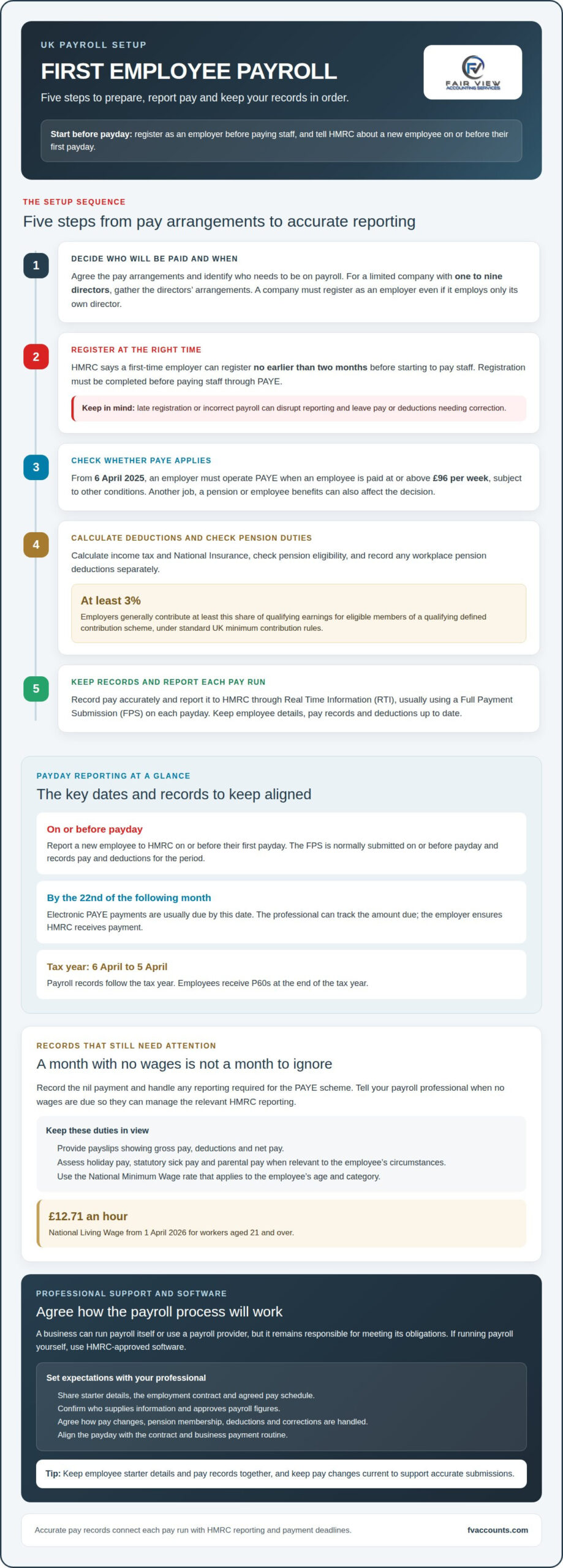
PAYE, FPS and Real Time Information reporting
Payroll support can coordinate deductions, submissions and tax-year records. Each stage connects the employee’s pay with HMRC reporting and payment deadlines.
-
Understanding PAYE deductions
Ask the payroll professional to calculate income tax and National Insurance deductions from each pay run. They use the employee’s pay details and tax status to work out the amounts, then record the net pay due. Check that the figures match the information supplied for that period. Workplace pension deductions are separate payroll entries, whilst liability insurance is a distinct employer responsibility.
-
How a payroll professional submits Real Time Information reports
Provide approved employee and pay details before payday so payroll can be processed accurately. Employers generally report payroll information to HMRC through Real Time Information on each payday. HMRC says a new employee must be reported on or before their first payday. The Full Payment Submission (FPS) is sent using the employer PAYE reference and records pay and deductions for that period.
-
How a payroll professional meets FPS and PAYE deadlines
Agree the payroll timetable with the professional, including when pay figures are ready and when you pay your employee. The FPS is normally submitted on or before payday. The professional tracks the PAYE amount due, whilst the employer ensures HMRC receives payment. Electronic PAYE payments are usually due by the 22nd of the following month. For year-end preparation, payroll records follow the tax year, which runs from 6 April to 5 April; employees receive P60s at the end of the tax year. Tip: keep pay changes and employee details current to support accurate submissions.
Fair View Accounting Services: Payroll
Fair View Accounting Services provides payroll support for businesses employing their first member of staff. The service helps organise employee pay, deductions and HMRC reporting, including Full Payment Submissions through Real Time Information. It can suit businesses that want professional help coordinating payroll or handling a month with no wages. Fair View Accounting Services supports businesses in Bolton, Bury, Lancashire, Manchester and London.
To get started, prepare the employee’s starter details, agreed pay and payday, and any relevant pension information. These details help establish a payroll process suited to your business and keep each pay run consistent. Fair View Accounting Services also offers Annual Accounts and Corporation Tax as separate services.
Contact Fair View Accounting Services to discuss payroll support.
Make your first hire a confident next step
Hiring your first employee can change how your business operates. Treat payroll setup as part of welcoming someone to the business, not just an administrative task. Knowing how to set up payroll for your first employee in the UK helps you decide what support you need as the business grows.
Consider how payroll fits alongside your wider accounting responsibilities. Fair View Accounting Services also offers an Accountant’s Certificate, Annual Accounts and Corporation Tax to support other financial requirements as your business develops.
Professional payroll support can help keep employee administration organised while you focus on your work. Choose a process that suits your business and gives you a clear point of contact for payroll questions.
With the right support in place, you can focus on helping your new employee settle in.
Frequently Asked Questions
Are there any payroll mistakes to avoid?
Yes. Misclassifying a worker or overlooking a change to their agreed hours can make payroll records inaccurate. As you plan how to set up payroll for your first employee in the UK, keep a clear record of their agreed role and tell the person processing payroll about changes before the next pay run. Tip: assign someone to approve updates.
Can an accountant run payroll for me?
Yes. An accountant can process payroll and manage the related administration. If you’re considering how to set up payroll for your first employee in the UK, an accountant can help establish a process that reflects the agreed pay arrangements and your business’s reporting needs. Your role is to provide accurate employee information and pass on changes promptly.
Do I need a pension for just one employee?
Having one employee does not remove workplace pension duties. Employers assess staff for automatic enrolment using the applicable age, earnings and working-arrangement criteria. Duties begin when the first staff member starts, even if nobody needs immediate enrolment. Also consider requests from staff who want to join a workplace pension scheme, including employees who do not meet automatic-enrolment criteria.
Employee or self-employed contractor?
The actual working relationship matters, not just the label in a contract. Consider the role, duties and how the work will be carried out before deciding whether someone is an employee or self-employed. Their status affects payroll and reporting responsibilities. If the arrangement is unclear, get professional advice before treating the worker as a contractor outside payroll.
How much does it cost to set up a PAYE scheme?
The cost of professional payroll setup varies with the work involved and the type of entity, so initial setup and ongoing processing may have different scopes. Before proceeding, ask for a quote that explains which tasks are included, such as establishing employee records or processing future pay runs. This makes the service easier to understand.
Disclaimer
The information provided in this article is for general guidance only and is not intended to constitute professional advice, tax advice, financial advice, legal advice, or any other form of regulated guidance. Although every effort has been made to ensure accuracy at the time of publication, Fair View Accounting Services, including its director, employees, contractors, writers, and content-creation team, accepts no responsibility for any loss, damage, penalty, or consequence arising from reliance on the information contained herein.
UK tax legislation changes frequently, and HMRC interpretations, thresholds, and rules may vary depending on the individual circumstances of each taxpayer. Nothing in this article should be considered a substitute for obtaining formal, personalised advice from a qualified accountant or tax professional. Readers should not take action or refrain from taking action based solely on the content published on this website.
Fair View Accounting Services does not guarantee the completeness, accuracy, or ongoing validity of the information provided and assumes no liability for omissions or errors, whether typographical, factual, or technical. By using this content, the reader acknowledges that all responsibility for decisions remains solely with the user.